
Track your Zetamac practice
Add ZetaLog to Chrome to save completed games automatically. Link an account when you want online progress and leaderboard rankings.
 Add to Chrome
Record your first game
Install ZetaLog
In the Chrome Web Store, select Add to Chrome then Add extension.
Keep the popup easy to find
Select Chrome's puzzle-piece icon, find ZetaLog then select its pin. Pinning is optional and does not affect recording.
Complete a Zetamac game
Open Zetamac. Refresh once if it was already open when you installed ZetaLog. Keep the default 120-second game and select Start.
Type each answer. A correct answer advances automatically. Your score is the number of correct answers before time runs out.
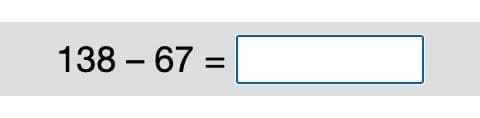
Enter your answer in the box. Let the timer reach zero. Closing the tab or restarting early does not save a result.
Find your result
Open ZetaLog from Chrome. Your completed score appears under Latest, with personal bests by game length and your recent history below.
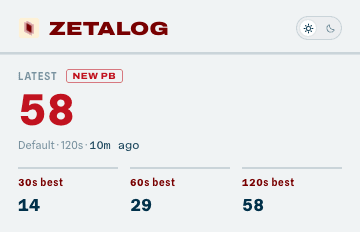
Your history stays in this browser until you link an account.
Optional
Sync your progress
Link this Chrome installation to keep online history, track your streak and compare your best scores. Sign in or create an account in the Chrome window, then return to the popup to check the connection.
Link extensionWhat counts for rankings
Ranked games use all four operations and the default number ranges, with a 30, 60 or 120-second timer. Uploaded records are validated before they rank. Other completed games remain useful local practice.
Your chosen name and best scores appear on public boards by default. You can make your account private in Account and keep using online progress.
Optional
Add a university badge
Verify a supported UK or US university email to add its mark beside your name and join its leaderboard. Your verified email also works for sign-in and is never shown publicly.
Verify university emailNot at university or prefer not to say? Choose that option in Account. You can use the global board without a badge and change this choice later.
Get help
A completed game is missing
Refresh Zetamac once, complete a full game then open the popup after the timer reaches zero. If the game is local but missing online, check that the extension is connected and whether uploads are waiting or under review.
The extension will not connect
Use desktop Chrome with ZetaLog installed and enabled. Open Link extension and check again. Complete sign-in in the Chrome window. Connecting an account does not by itself confirm that a game has synced, so check My progress after playing.
A verification code has not arrived
Check junk or spam. If your email uses Microsoft 365 or Outlook, open the Microsoft quarantine page, find the ZetaLog email then select Release.
Wait one minute then request a new code from the code-entry screen. At most three university verification emails can be sent per address per hour.
Local data, uploads and deletion
Games stay on your device before linking. After linking, eligible records upload for validation and pending uploads can retry later. Unlink in the popup to stop syncing. Signing out of the website does not unlink the extension.
You can remove games from rankings or delete your account in Account. Local history stays on this device until you remove it or uninstall the extension. Read the privacy policy for the full data description.